Domain Controller Traffic Troubles? Here’s a Script to Save Your Sanity

Let’s be honest — we’ve all been there.
One day, things are working fine. AD replication is happy, secure channels are intact, logons are snappy. The next? You’re staring at replication failures, secure channel trust issues, and those vague “RPC server is unavailable” errors that make you want to flip a table.
So, I built a script.
A proper, domain controller communication tester. Not just a ping test. Not just a port check. This script goes full throttle and checks bidirectional traffic between all your DCs, port by port, protocol by protocol — and even includes RPC secure channel checks, NLTEST validation, and output that’s actually useful when you’re troubleshooting.
Why I Created This
In most AD environments I manage, connectivity issues creep in silently — a new firewall rule, a blocked UDP port, a misconfigured route. You only catch it when replication starts failing or users complain.
I wanted a script I could run:
- On-demand or via scheduled task
- With clear output (CSV and on-screen)
- That shows if a port is open, blocked, or partially reachable
- And whether the issue is one-way or bidirectional
That’s what this script does. And now you can use it too.
What Does the Script Actually Do?
Here’s what’s under the hood:
- Discovers all Domain Controllers in the domain
- Tests TCP and UDP ports used by AD (Kerberos, LDAP, DNS, SMB, GC, LDAPS, etc.)
- Validates RPC Secure Channel health using both Test-ComputerSecureChannel and nltest
- Runs bidirectional tests between every pair of DCs (yes, even reverse direction)
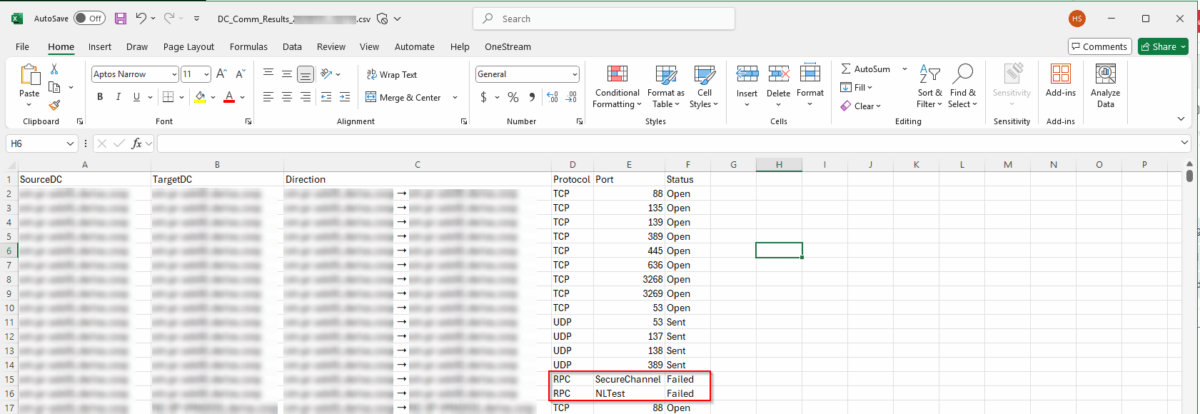
- Outputs everything to a readable CSV (with source, target, direction, protocol, port, and status)
- Clears the screen, shows a branded banner, and logs everything with timestamps
Use Cases
This script is now part of my toolkit. I use it:
- During AD Health Checks
- Before and after Domain Controller deployments
- During DR testing (to validate traffic between primary and DR sites)
- In environments with site-to-site VPNs, firewall appliances, or isolated networks
- And when I get called in for “slow logon” or “can’t find DC” complaints
Sample Output
The script tells you exactly what’s working and what’s not — for every DC to every other DC:
| SourceDC | TargetDC | Direction | Protocol | Port | Status |
| DC01 | DC02 | DC01 ➝ DC02 | TCP | 389 | Open |
| DC02 | DC01 | DC02 ➝ DC01 | TCP | 389 | Blocked |
| DC01 | DC02 | DC01 ➝ DC02 | RPC | SecureChannel | Valid |
One look and you know where the problem lies. It’s like having a traffic cop for your domain controllers.
Output File looks as follow:
Get the Script
I’ve published the full script here in my GitHub repo:
👉 Download it on GitHub – DCCommCheck.ps1
Star the repo if you find it useful — I’ll keep adding features as I go.
Final Thoughts
Active Directory is only as strong as the network between your DCs. And when something goes wrong, the quicker you can identify the culprit, the better.
This script gives you a clear snapshot of the traffic health across your domain controllers. You’ll know instantly if it’s a port issue, firewall misconfiguration, or a trust problem.
Give it a run. Schedule it. Use it during audits. And if you love it — or find ways to improve it — ping me.
—
Shaun Hardneck
www.thatlazyadmin.com
Microsoft 365 & Azure Security Consultant