
Step-by-Step Guide to Running the Defender for Identity Sizing Tool
In this post, I’ll walk you through how to run the Microsoft Defender for Identity Sizing Tool on your domain controllers. This tool is essential to ensure that your environment is ready to deploy Microsoft Defender for Identity by analyzing and reporting on key system metrics like CPU, memory, storage, and bandwidth requirements.
Here’s a step-by-step guide to help you execute the sizing tool correctly.
Download the Sizing Tool:
- Navigate to the official Microsoft Defender for Identity documentation page and locate the download link for the sizing tool Download Sizing Tool.
- Ensure that you are downloading the latest version for accurate results.
Prepare Your Domain Controller:
- Log in to the domain controller with administrative privileges.
- Confirm that PowerShell version 5.0 or later is installed on the server. You can check this by running the following command:
$PSVersionTable.PSVersion
- Make sure you have sufficient permissions to run scripts and install software.
Extract and Set Up the Tool:
- Once downloaded, extract the contents of the .zip file to a folder on the domain controller.
- Open PowerShell as an Administrator, and navigate to the folder where the tool was extracted.
Run the Sizing Tool:
- The sizing tool is run by executing a script provided within the extracted folder. You will need to adjust the execution policy if required. Run the following command to allow scripts to run:
Set-ExecutionPolicy -ExecutionPolicy RemoteSigned
- Next, run the following command to start the tool:
.\SizingTool.ps1
- The tool will now begin collecting sizing data from the domain controller.
Collect and Review the Results:
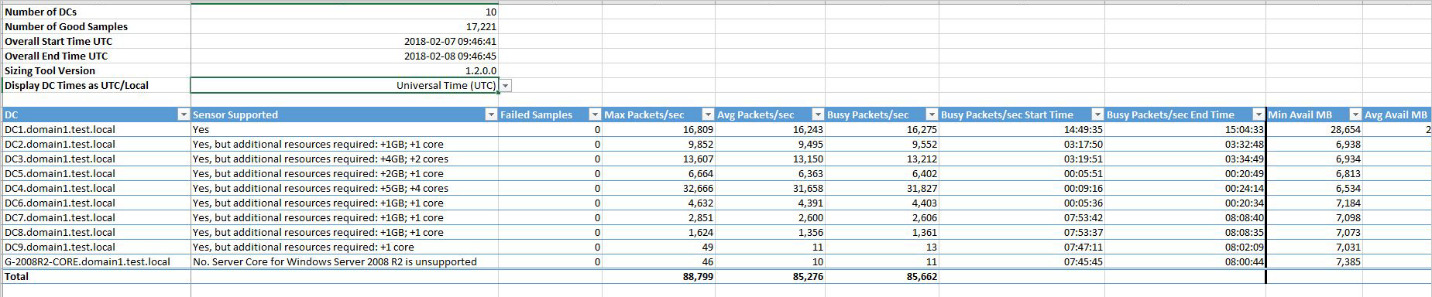
- Once the sizing process is complete, a detailed report will be generated. This report will give you insights into the bandwidth, CPU, memory, and storage requirements for your Microsoft Defender for Identity deployment.
- Review the output to ensure your environment meets the recommended requirements.
Adjust Settings (If Required):
- If your environment needs adjustments based on the tool’s output (e.g., additional resources on domain controllers), I’d be happy to assist you with those recommendations.
Conclusion
Running the Microsoft Defender for Identity Sizing Tool is a straightforward but crucial step to ensure a smooth deployment. The tool gives you the insights needed to optimize your infrastructure for performance and scalability.
If you have any questions or need assistance with your Defender for Identity deployment, feel free to reach out. I’m here to help make sure your environment is fully prepared.