
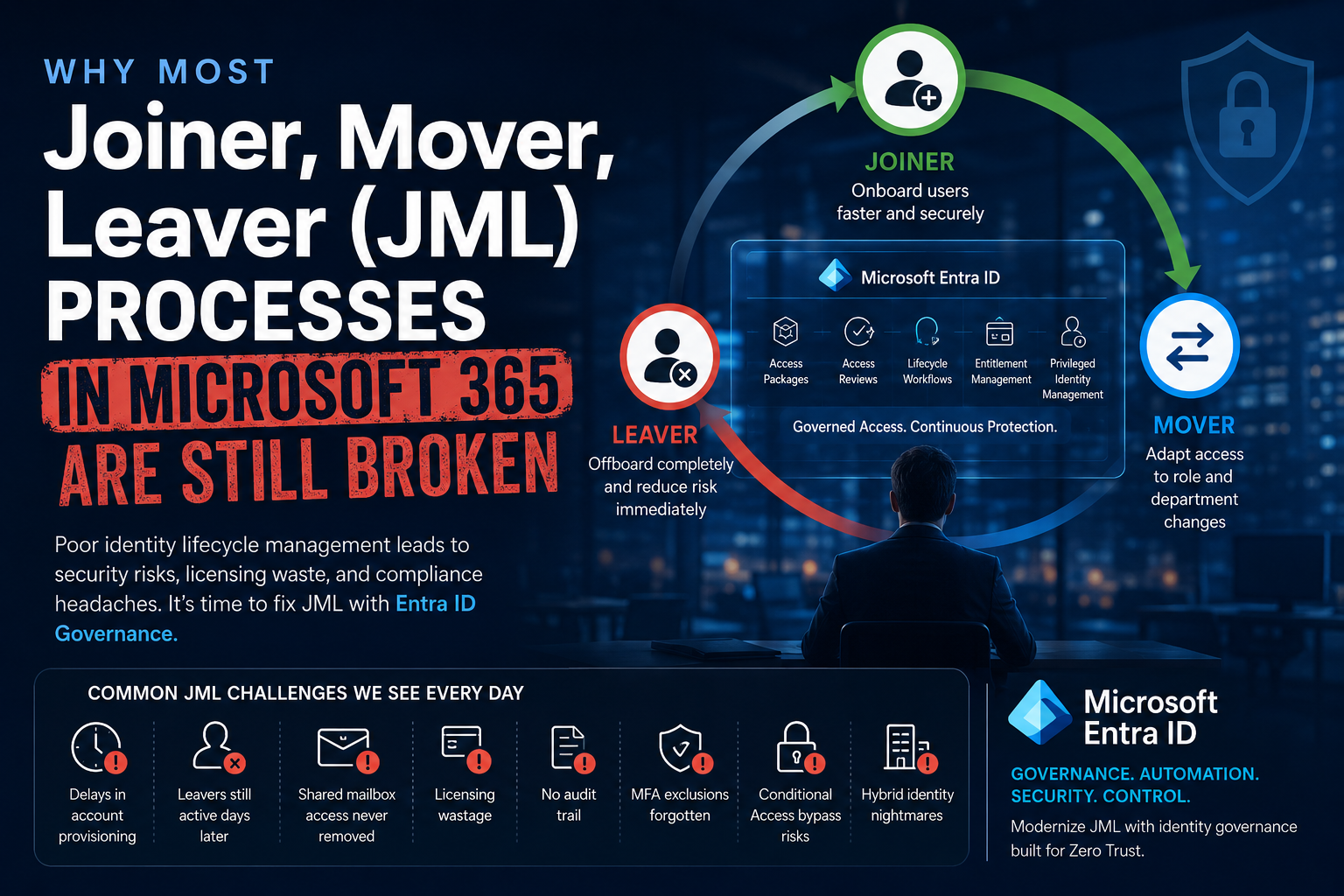
Why Most Joiner, Mover, Leaver (JML) Processes in Microsoft 365 Are Still Broken
Author: Shaun Hardneck — www.thatlazyadmin.com
Most organisations believe they have a proper Joiner, Mover, Leaver (JML) process in place. In reality, many environments are still relying on manual onboarding emails, inconsistent approval chains, shared spreadsheets, and operational workarounds that have evolved over years without proper governance.
At first glance, the process appears functional. New users get accounts. Employees eventually receive access to applications. Leavers are usually disabled at some stage. The real problems only start becoming visible as the environment grows and security requirements become more demanding.
A Microsoft 365 environment is no longer a simple identity platform. A single user account today touches Microsoft Entra ID, Exchange Online, Teams, SharePoint, OneDrive, Intune, Conditional Access, Defender XDR, third-party SaaS applications via SCIM, VPN solutions, and in many cases still hybrid Active Directory. When identity lifecycle management is poorly governed, the impact spreads across every one of those systems.
The challenge is that many organisations still treat JML as an administrative IT task instead of what it has become — a core identity security and governance function.
The Problem Starts with Manual Identity Processes
One of the biggest weaknesses in most tenants is that onboarding still starts with manual communication between HR and IT. A manager submits a request, HR sends an email, somebody logs a service desk ticket requesting account creation.
From there, the process becomes heavily dependent on individual administrators.
One engineer creates the user one way, another uses a different naming standard, someone manually assigns licensing, and another administrator adds mailbox permissions based on what they believe the user requires. Over time this creates inconsistent identity management across the tenant.
This becomes especially problematic when organisations scale quickly or operate across multiple departments and support teams. Common issues start appearing:
- Incorrect licensing assignments
- Users added to the wrong security groups
- Inconsistent naming conventions
- Missing manager or department attributes
- Excessive permissions inherited from a “similar user”
- Duplicate accounts
- Incorrect mailbox access
The real issue is not the account creation itself. It is the lack of governed identity orchestration behind the process.
A mature JML environment treats the HR system as the authoritative source of lifecycle events. When an employee joins, changes departments, or leaves the organisation, those events trigger structured identity workflows automatically instead of relying on manual interpretation.
In Microsoft Entra this means using inbound provisioning from supported HR sources — Workday, SAP SuccessFactors, or generic systems via API-driven inbound provisioning — to write the user object, populate the critical attributes (department, jobTitle, employeeType, manager), and trigger downstream automation. Once those attributes are present and reliable, almost everything else can be derived from them.
Mover Processes Are Usually Neglected
Most organisations focus heavily on onboarding and offboarding, but the “Mover” part of JML is where identity governance quietly breaks down.
When employees move internally, they typically retain historical access while new permissions are added on top. Over time users accumulate access across departments, Teams environments, SharePoint sites, shared mailboxes, and business applications that are no longer relevant to their current role.
A user who started in finance, moved into operations, and later transitioned into management may end up retaining years of inherited access that nobody ever reviewed properly. This creates excessive privilege exposure without anybody intentionally granting overly broad access.
The fix is mostly structural. If HR attributes are reliable, internal moves can be handled automatically through:
- Dynamic security groups scoped by department, jobTitle, or employeeType
- Group-based licensing so licence assignment follows the role, not the admin
- Dynamic Conditional Access scoping so policy follows the user into their new context
- Access Reviews to continuously validate that older access still has a justification
This is also where Microsoft Entra ID Governance becomes important. Access Reviews and Entitlement Management allow organisations to continuously validate whether users still require the access they currently hold, instead of treating permissions as permanent assignments.
Without governance reviews, access simply accumulates forever.
Shared Mailboxes Quietly Become a Governance Risk
Shared mailboxes are another area where weak JML processes create long-term security and compliance issues.
Initial access assignments seem harmless. Somebody requires temporary access to a finance mailbox, an executive assistant needs visibility into leadership communication, or a support team needs shared customer correspondence access. The problem is that these permissions are rarely reviewed again.
Over time tenants end up with:
- Former employees still retaining access
- Nested group permissions nobody understands
- No documented mailbox ownership
- Sensitive mailboxes exposed to unnecessary users
- Manual permission assignments with no approval tracking
In many environments, nobody can confidently explain why certain users still have access to sensitive shared mailboxes years later. This becomes a major governance problem in finance, HR, legal, and executive administration where mailbox content may contain confidential or regulated information — and in healthcare, where the exposure can be regulatory.
The right direction is:
- Group-based mailbox access through mail-enabled security groups, noting that Full Access works cleanly, Send As via groups behaves differently, and AutoMapping needs to be set explicitly per assignment
- Approval-driven access assignment via Entitlement Management access packages
- Periodic access reviews for sensitive mailboxes
- Automated permission removal as part of the offboarding workflow
This is not just operational hygiene anymore. It is part of identity security governance.
Offboarding Is Usually the Weakest Control
The most dangerous gaps in JML processes almost always appear during offboarding.
Many tenants still treat offboarding as “disable the account and move on.” That was acceptable in a pure on-premises AD world. It is not acceptable in Microsoft 365.
Disabling an account in Entra ID does not, by itself:
- Revoke active refresh tokens
- Terminate active mobile or browser sessions
- Remove mailbox permissions held by that user
- Remove the user from Teams and shared channels
- Remove privileged role assignments (active or eligible)
- Remove Conditional Access exclusions
- Transfer ownership of M365 Groups, Teams, or Enterprise Applications the user owns
- Trigger device compliance or wipe actions
- Handle OneDrive or mailbox data retention
This creates situations where a terminated employee can still authenticate against M365 services for a period after their account was “disabled” — because their previously issued refresh tokens remain valid until they expire or are explicitly revoked.
The correct pattern at termination is:
- Block sign-in (accountEnabled = false)
- Revoke sign-in sessions using Revoke-MgUserSignInSession, which invalidates refresh tokens
- Reset the password
- Rely on Continuous Access Evaluation (CAE) to propagate the change to CAE-aware workloads (Exchange Online, SharePoint Online, Teams, Graph) in near real time
- Remove or expire any active and eligible PIM role assignments
- Convert the mailbox to shared (after any applicable litigation or retention hold is in place)
- Transfer OneDrive ownership to the manager
- Reassign ownership of any M365 Groups, Teams, or Enterprise Applications the user owned
- Handle the device — Intune retire / wipe, Autopilot deregistration, BitLocker recovery key custody
- Deprovision the user from downstream SaaS via SCIM
Most of this should not be a manual checklist. Lifecycle Workflows in Microsoft Entra ID Governance are designed for exactly this: a workflow triggered by the leaver event runs the standard steps, and anything Microsoft does not natively cover can be plugged in via Custom Task Extensions calling Logic Apps or Azure Functions.
This is where lifecycle automation and identity governance stop being administrative convenience and become security operations.
Conditional Access Exceptions Become Hidden Security Debt
Conditional Access and MFA exclusions are another quiet failure mode. Almost every tenant has them.
Somebody experiences login issues during onboarding, a legacy application cannot support modern auth, or a temporary bypass is created for operational reasons. The problem is that temporary exceptions rarely remain temporary. Months later the exclusion group still exists. Years later nobody remembers why the exception was created.
Over time tenants accumulate:
- MFA bypass groups
- Legacy authentication exclusions
- VIP exceptions
- Temporary contractor bypasses
- Shared / service account exclusions
One caveat is worth stating clearly, because the opposite extreme is also wrong: break-glass / emergency access accounts must be excluded from your Conditional Access policies by design. That is not technical debt, it is Microsoft’s own guidance. The problem is the uncontrolled, undocumented, unreviewed exclusions — not the deliberate ones.
Microsoft Entra ID Governance addresses this through:
- Time-bound assignments for access package and group membership
- Approval workflows for sensitive group joins
- Access reviews for membership of exclusion groups
- Just-in-time privileged access via PIM
- Governance reporting and entitlement tracking
The key shift is moving away from permanent trust toward continuously validated access.
Automation Alone Does Not Solve the Problem
One of the biggest mistakes organisations make is rushing into automation before defining governance standards.
Automation without governance simply lets you scale poor identity practice faster.
Before automating JML workflows, define:
- Role definitions
- Group ownership
- Naming standards
- Approval processes
- Access review policies
- Conditional Access standards
- Offboarding requirements
- Privileged access governance
Only then should automation be introduced. Otherwise the result is industrial-scale identity sprawl.
Why Entra ID Governance Is Becoming Essential
Many organisations deploy Microsoft Entra ID primarily for authentication and Conditional Access while underutilising the governance capabilities entirely. This is where real lifecycle maturity actually starts.
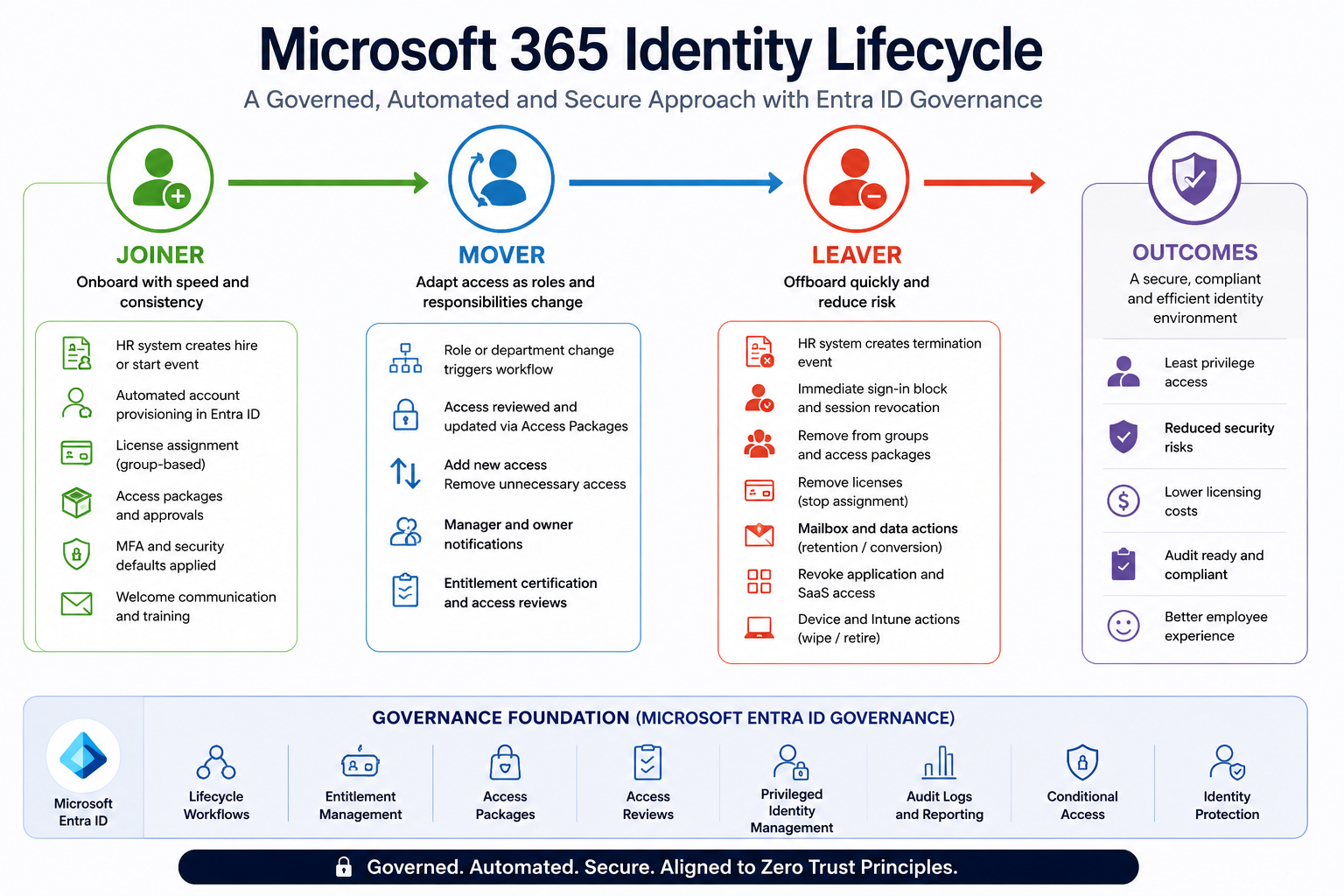
A quick licensing reality check, because this matters for planning:
- Entra ID Free / P1 — authentication, basic Conditional Access, group-based licensing
- Entra ID P2 — adds PIM and basic Access Reviews
- Microsoft Entra ID Governance — a separate add-on SKU that unlocks Lifecycle Workflows, full Entitlement Management with Access Packages, advanced Access Reviews (including guests and access packages), and inbound provisioning from HR sources
If you are serious about lifecycle governance, the Governance SKU is usually the missing piece — not the absence of effort.
The capabilities that actually matter:
- Lifecycle Workflows — pre-built or custom workflows triggered by joiner, mover, leaver events, on a schedule or on-demand, extensible via Custom Task Extensions
- Entitlement Management with Access Packages — bundled access (groups, apps, SharePoint sites) requested through a catalog, gated by approval, time-bound, and reviewable
- Access Reviews — periodic validation that current access is still justified
- Privileged Identity Management (PIM) — eligible (not permanent) admin roles, activated just-in-time with approval and MFA
These features allow organisations to move away from permanently assigned access and manual provisioning toward governed identity lifecycle management aligned with Zero Trust principles.
Instead of asking “Does the user need access?” — the question becomes “Does the user still require access?”
That difference is what separates basic identity administration from mature identity governance.
What Good Looks Like
If you want a single reference to take into a planning conversation, this is it.
| Stage | Manual symptom | Governed control |
| Joiner | Service desk ticket → manual account creation; inconsistent attributes | HR-driven inbound provisioning (Workday / SuccessFactors / API-driven) + Lifecycle Workflows + group-based licensing + dynamic groups |
| Mover | New permissions added, old permissions never removed | Attribute-driven dynamic groups + scheduled Access Reviews + role-based access packages |
| Leaver | Account disabled; sessions, tokens, ownership, and data left behind | Lifecycle Workflow → Revoke-MgUserSignInSession + CAE + mailbox conversion + OneDrive handover + group / app ownership reassignment + Intune retire |
| Privilege | Permanent admin role memberships | PIM with eligible, time-bound, approval-gated, MFA-required activation |
| Exceptions | CA / MFA bypass groups accumulating with no owner | Time-bound assignments + quarterly Access Reviews + documented break-glass accounts only |
| Shared mailboxes | Permissions added directly, never reviewed | Group-based access + access packages + documented owner + periodic review |
| Downstream SaaS | Manual offboarding, often forgotten | SCIM provisioning from Entra to each app |
Final Thoughts
Most organisations do not intentionally create weak JML processes. These environments evolve over many years through operational shortcuts, business pressure, rapid growth, and temporary workarounds that quietly become permanent.
The problem is that identity has now become the primary security perimeter in Microsoft 365. Weak lifecycle governance no longer creates only operational inefficiencies — it creates real, measurable security exposure.
The organisations maturing successfully are the ones treating JML not as an IT admin task but as a governed identity security function, tied directly into Microsoft Entra ID Governance, Zero Trust, and modern access control.
Because in a Microsoft 365 tenant today, identity lifecycle management is no longer just about creating accounts. It is about controlling and governing access from the moment a user enters the organisation, through every internal move, until the moment that access should no longer exist.
If your environment is still running on tickets, spreadsheets, and “we’ll review it next quarter,” start with one thing: get HR attributes flowing into Entra reliably. Almost every other improvement in this post becomes achievable from that single foundation.
Author: Shaun Hardneck — www.thatlazyadmin.com