Why You Need to Stop Using onmicrosoft.com for Emails in Microsoft 365
|

Why You Need to Stop Using onmicrosoft.com for Emails in Microsoft 365

When you spin up a new Microsoft 365 tenant, Microsoft automatically gives you a default domain — usually something like thatlazyadmin.onmicrosoft.com. These MOERA (Microsoft Online Email Routing Address) domains are incredibly handy at the beginning. They let you test, create users, and send mail right away, even before you’ve bought a proper domain. But here’s…

Enhancing Email Security with the “SecureMailBannerInjector” PowerShell Script
| | | | |

Enhancing Email Security with the “SecureMailBannerInjector” PowerShell Script

Enhancing Email Security with the “SecureMailBannerInjector” PowerShell Script Introduction In an era where cybersecurity threats are continually evolving, organizations must proactively defend their communication channels. Email, a critical business tool, is often exploited by attackers to deploy phishing scams, spread malware, or execute social engineering attacks. To address these risks, I’ve developed a PowerShell script,…

| |

Streamlining High Volume Email Management in Microsoft 365 with PowerShell

Streamlining High Volume Email Management in Microsoft 365 with PowerShell I developed the HVEAccountManager.ps1 script to streamline the administration of High Volume Email (HVE) accounts in Microsoft Exchange Online. This script harnesses the capabilities of automation to ease this process, offering a straightforward and effective tool for HVE account management. It exemplifies how automation can…

Introducing High Volume Email for Microsoft 365: A Game-Changer in Enterprise Communication
| | |

Introducing High Volume Email for Microsoft 365: A Game-Changer in Enterprise Communication

Introducing High Volume Email for Microsoft 365: A Game-Changer in Enterprise Communication In the modern enterprise landscape, the ability to communicate efficiently and at scale is paramount. Recognizing this need, Microsoft has unveiled a groundbreaking solution to address one of the most pressing challenges faced by businesses today: email volume constraints. The public preview of…

How to Enable Microsoft 365 Backup Using the Admin Portal
| |

How to Enable Microsoft 365 Backup Using the Admin Portal

How to Enable Microsoft 365 Backup Using the Admin Portal Introduction: Microsoft 365 offers a suite of powerful productivity tools, but data loss can still happen. To ensure the safety of your critical business data, it’s essential to set up regular backups. In this blog post, we will walk you through the process of enabling…

| |

How to Unblock a User if they were blocked from sending emails in Microsoft 365

How to Unblock a User if they were blocked from sending emails Microsoft 365 Users in your organization might get blocked from sending emails in Microsoft 365 if they exceed one of the outbound sending limits or inbound spam policies. If a user is added to the restricted user list, they will receive the following…

Exchange TIP: How to Migrate Mailbox from Exchange Online to Exchange OnPrem
| | | |

Exchange TIP: How to Migrate Mailbox from Exchange Online to Exchange OnPrem

Exchange TIP: How to Migrate Mailbox from Exchange Online to Exchange OnPrem In this quick post, I will go through a quick PowerShell I use to migrate a mailbox from Exchange Online back to Exchange Onprem. Let’s first start by connecting to Exchange Online PowerShell. Once connected run the following: Before we can run the…

How to set the default Font Exchange Online for All Users
| |

How to set the default Font Exchange Online for All Users

How to set the default Font Exchange Online for All Users In this post, I will go over the process the set the default font and size for users in OWA as well as set the default font and size for all Exchange Online users. To get started, Open OWA Navigate to Settings > View…

Callout External Senders in Outlook
| | | | |

Callout External Senders in Outlook

What is External Sender Callouts? External Callouts is what some organisations use to inform their staff that an email is coming from outside of their environment. IT Admins has created transport rule like this one http://www.thatlazyadmin.com/how-to-prepend-office-365-email-subject-when-email-is-received-from-external-sender/ The transport rule approach has some limitations which has been listed by Microsoft based on feedback from customers. You…

A screenshot of a cell phone Description automatically generated
|

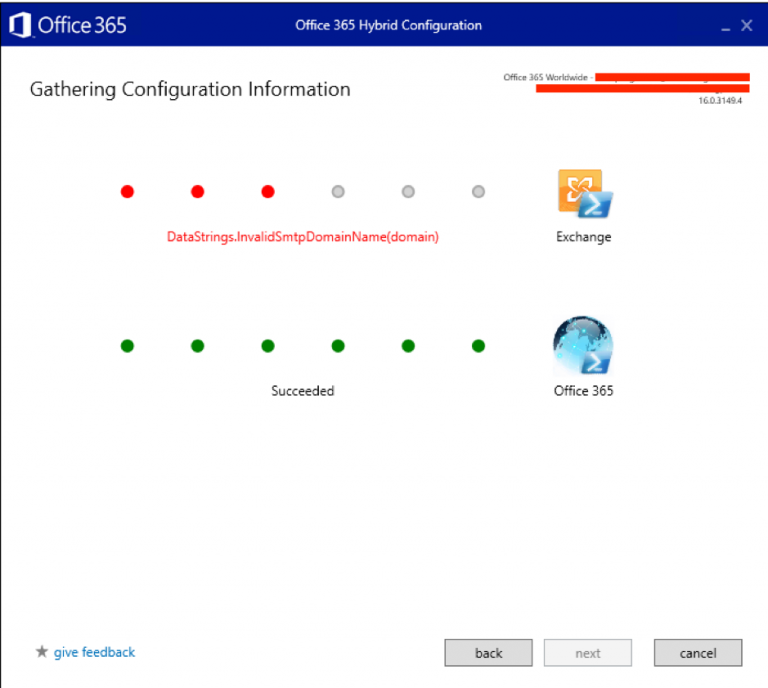
DataString.InvalidSmtpDomainName(Domain) when running the Office 365 hybrid Configuration Wizard.

DataString.InvalidSmtpDomainName(Domain) when running the Office 365 hybrid Configuration Wizard. In this post, I will show case how you can remove the following error when you tried to install the Office 365 Hybrid Configuration Wizard. This error typically indicates that you have an Exchange server in your environment that is Offline or has not been decommissioned…

How to create a migration endpoint Exchange Online
|

How to create a migration endpoint Exchange Online

How to create a migration endpoint Exchange Online In post we, will go through the steps to create a new migration endpoint for Exchange Online. To get started, connect to Office 365 Admin Portal then navigate to Exchange Online Admin Portal. From the Exchange admin centre, click on “Recipients”. From the “Recipients” menu select “migration”…

Create Office 365 Dynamic Distribution Group
| | | |

Create Office 365 Dynamic Distribution Group

Create Office 365 Dynamic Distribution Group In this short post we will look at how to create Dynamic Distribution Groups in Office 365 using Azure AD, Exchange Online PowerShell. To get started we will look at how to create a Dynamic Distribution group using Azure AD. Navigate to Azure Active Directory > Mange >> Groups…